
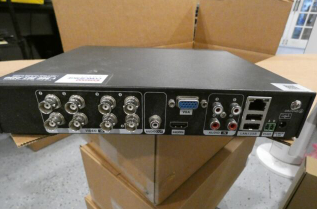
A DVR transforms analog footage into a digital format, while an NVR basically only works with digital footage. DVR systems process data at the recorder, while NVR systems decode and process data at the camera before transmitting it to the recorder for storage and remote viewing. Unless they’ve been rearranged, the DVR connects to an analog CCTV system through a coaxial cable, while the NVR connects to an IP camera system through an Ethernet or WiFi connection.
Are you worried about how to factory reset a night owl DVR or NVR? Well, then you must read this article, below, we have provided you with some quick solutions on how to factory reset a night owl DVR or NVR.

DVR-THD30B-81, DVR-THD50B-81, and DVR-THD80B-82.
Step 1: Right-click anywhere on the screen to bring up a drop-down menu.
Step 2: Select Main Menu (you may need to log in after this).
Step 3: Select the Maintenance tab.
Step 4: Choose the Default Sub-tab. Click Factory Defaults on this screen to reset all parameters to their default values.
Step 5: Following this step, your system will reboot.
These Night Owl models are affected: WNVR-20B-4, WNVR-20B-8.
Right-click everywhere on the screen to bring up the quick open bar at the bottom.
Step 1: Select the main navigation bar (you may be required to log in shortly after this step).
Step 2: Navigate to the Maintenance tab.
Step 3: On the left menu, click the Factory Default Sub-tab.
Step 4: On this screen, select All to factory reset all of your NVR settings and then click Apply.
Step 5: After this step, your system will restart.
Q1. How to Reset Night Owl Dvr?
Ans: To reset Night Owl DVR access the device menu, navigate to the system settings or maintenance section and locate the Factory Reset or Restore Defaults option.
Q2. How to Factory Reset Night Owl Dvr?
Ans: To factory reset Night Owl DVR access the device menu typically found in the settings or maintenance section. Locate the Factory Reset option and initiate the process.
Q3. Will factory resetting my Night Owl DVR delete all recorded footage?
Ans: A factory reset on a Night Owl DVR resets all system settings like network configuration, recording schedules, motion detection zones, and the admin password back to defaults. However, it does not automatically erase the recorded footage stored on the hard drive. Your recordings should still be on the HDD after the reset. If you want to completely wipe the footage as well, you need to separately format the hard drive from the Storage Management section in the DVR menu after the reset. Always back up any important recordings to a USB drive before performing either a factory reset or a hard drive format just to be safe.
 Published by: Peter Brand: Smart Devices Last Update: 1 week ago Reading Time: 2 min
 Related Blogs
 Jun 8, 2025

Top 11 Best Smart Home Devices & Systems of 2026
Jun 9, 2025

How to Use Google Lens on iPhone?
Jun 10, 2025

Top 7 Best Smart Home Security Systems of 2026
Jun 13, 2025
How to Connect Philips Hue Devices?
Jul 6, 2025
© 2026 SmartDevicesHelp.com. All Rights Reserved.


Top Searches in smart devices